
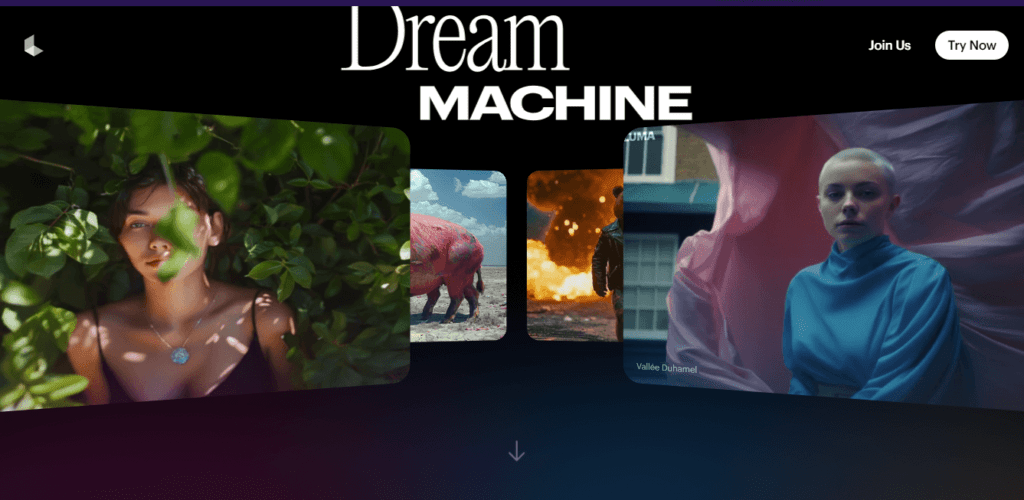

Imagine creating highly realistic videos using AI with just a few clicks. With Dream Machine by Luma Labs, this is now possible. As AI continues to evolve, Luma Labs has positioned itself as a leader in AI-driven video generation, offering filmmakers a tool that combines ease of use with unparalleled video quality. But is Dream Machine the right tool for your filmmaking needs?
In this review, we’ll explore Dream Machine’s key features, how it stacks up against competitors like Runway ML Gen-3 Alpha, and whether it’s the game-changer filmmakers have been waiting for.
What is Dream Machine by Luma Labs?
Dream Machine is the latest innovation from Luma Labs, a company known for pushing the boundaries of AI video generation. It’s designed to help filmmakers, content creators, and artists generate high-quality videos with minimal effort. The tool uses advanced AI to create videos that are not only realistic but also consistent in motion and detail, making it a standout in the rapidly growing field of AI video tools.
Key Features
Text-to-Video Generation
At its core, Dream Machine allows users to generate videos from text prompts. The AI interprets these prompts to create coherent and high-quality videos, making it an ideal tool for filmmakers who need to visualize concepts quickly.
Image-to-Video Animation
One of Dream Machine’s most impressive features is its image-to-video animation capability. Users can upload images and use them as the basis for video creation. This feature shines when it comes to preserving the identity of subjects and maintaining consistent details throughout the video.
Realistic Motion and Detail Preservation
Dream Machine excels in maintaining the realistic motion and fine details of subjects within the video, such as facial expressions, textures, and environmental elements. This makes it particularly useful for filmmakers looking to create lifelike scenes.
How to Use Dream Machine
- Sign Up: Visit the Luma Labs website and sign up for a free account.
- Choose a Prompt: Either enter your own text prompt or select from suggested prompts.
- Upload Images: If you want to animate specific images, use the uploader feature.
- Generate and Review: Click “Generate” and wait for your video to render. Review the results and refine your prompt as needed.
- Download Videos: Go to “My Videos” to download your generated videos.
Performance Analysis
Realism vs. Artistic Styles
Dream Machine is particularly strong in generating realistic videos. However, it struggles slightly when tasked with producing videos in more artistic or animated styles, like Pixar or Studio Ghibli, where the results can be less coherent.
Strengths and Limitations
The tool is excellent at maintaining detail consistency and handling complex motions, though it can struggle with high levels of motion, leading to occasional warping or distortion. Additionally, some minor issues with anatomy and object deformation persist, particularly when the AI tries to add too much movement.
Comparison with Competitors
Dream Machine vs. Runway ML Gen-3 Alpha
While Runway ML Gen-3 Alpha is known for its rapid rendering and dynamic scene generation, Dream Machine stands out for its image-to-video capabilities and detail preservation. However, Runway might offer more flexibility in terms of camera angles and complex scene creation.
Dream Machine vs. Other AI Tools
Compared to other AI video generators, Dream Machine offers a more balanced approach to realism and usability. Tools like Magnific may excel in specific areas like film editing, but Dream Machine provides a more comprehensive solution for video generation from both text and images.
Pricing and Availability
Dream Machine is currently available for free with a limited number of video generations per month. Users can opt for paid plans if they require more video generations or higher-quality outputs. Check the Luma Labs website for the most up-to-date pricing information.
Pros and Cons
Pros
- High-Quality Video Outputs: Consistent and realistic video generation.
- User-Friendly: Easy to use with straightforward prompts and settings.
- Free to Try: Offers a generous free plan with enough features to test the platform thoroughly.
Cons
- Motion Limitations: Struggles with high levels of motion, leading to possible distortions.
- Artistic Styles: Less effective at generating videos in non-realistic styles.
Conclusion
Dream Machine by Luma Labs is a powerful tool for filmmakers and content creators looking to leverage AI for video generation. While it excels in realism and detail preservation, it has some limitations with artistic styles and complex motion. Nevertheless, its ease of use and free trial make it an attractive option for those looking to experiment with AI-driven video creation.
Have you tried Luma Dream Machine or other AI video generators? We’d love to hear about your experiences in the comments below!
Disclaimer: This review is based on our personal experience with Luma Dream Machine. Features and pricing may change over time. Always refer to the official Luma Dream Machine website for the most current information.
If you found this review helpful, you might also be interested in our analysis of other AI tools:
- Klng AI Review
- Exploring the Capabilities of Runway’s Gen-3 Alpha
- Pika Labs: A New Frontier in AI Video Generation
Stay tuned for more insights into the latest AI technologies shaping the future of content creation!
Dream Machine by Luma Labs FAQ
What is Dream Machine?
Dream Machine is an AI-powered video generator that can create realistic, high-quality videos from simple text prompts.
How does Dream Machine work?
Luma Dream Machine uses advanced machine learning algorithms to understand and interpret text prompts, generating corresponding video sequences.
What kind of videos can Dream Machine create?
Dream Machine can create a wide range of videos, from short clips to feature-length films, in various styles and genres.
Is Dream Machine easy to use?
Yes, Dream Machine is designed to be user-friendly, even for those without technical expertise. Its intuitive interface makes it easy to create videos with just a few clicks.
Can I use Dream Machine to create commercial videos?
Yes, you can use Dream Machine to create commercial videos. However, it’s important to review the terms of service and any licensing agreements associated with the tool.
Is Dream Machine free to use?
Dream Machine offers a free tier with limited features, but to access its full capabilities, you may need to subscribe to a premium plan.
How long does it take to generate a video with Dream Machine?
The generation time can vary depending on the complexity of the prompt and the desired video length. However, Dream Machine is generally known for its relatively fast generation times.
Can I customize the generated videos by Luma Dream Machine?
Yes, you can customize the generated videos by adjusting various settings, such as style, length, and camera movement.